
Usage Calculation Options
This screen is accessed from the Options menu, but only if you are viewing the list of vehicles on file as shown below.
To view the vehicle list, use the following menu path: View menu / Open the Vehicle List.
Once you are at the 'Vehicles on file' screen, pulldown the main window Options menu and select Annual Use Calculations. (If you are not viewing the vehicle list, this menu option disappears.)
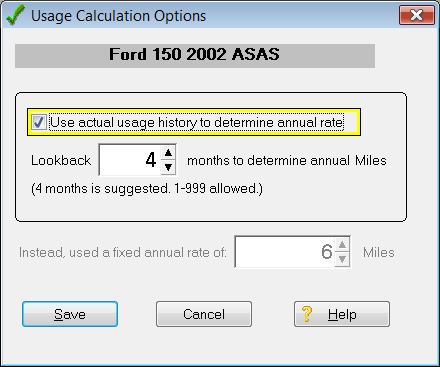
You can specify different usage calculation options for each vehicle. Notice the particular vehicle in question is identified at the top of the Usage Calculations Options screen.
Now, decide whether to check the box that indicates which calculation method to use.
Box checked (recommended): The program will use recent driving history to project future due dates and distance.
Next, use the Lookback spin control to specify how many months to look back in order to calculate your annual usage (miles, km, or hours) rate. Four (4) months is the default if you never come to this screen.
Five or ten years ago, the amount of annual driving you did probably does not apply very well to what is due next week, next month or next year. Recent use is a better indicator. That is why FleetVIP calculates based on recent use rather than a simple average use for the life of the vehicle or unit.
Box not checked: The program will use a fixed annual mileage (or Km or Hours) rate that you specify. Let's say you just changed jobs, or for some reason, your use went way up or way down. You can just specify the annual use and go with that. But the program will not learn anymore from recent driving. It will use the fixed rate forever until you come back here and change it again.
TIP: It is recommended to leave the box checked and use 4 months lookback.
Click for more info on due date logic.