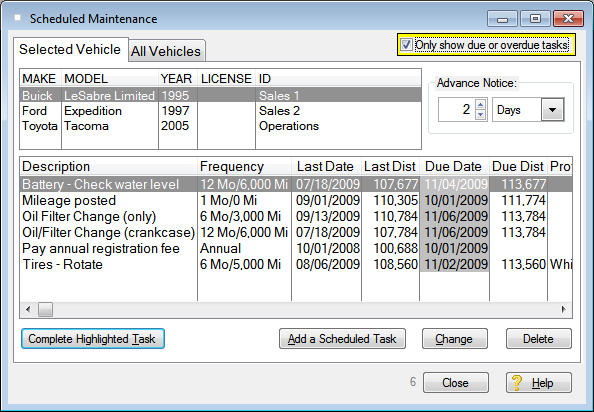
Scheduled Maintenance A Maintenance Schedule is a list of tasks that need to be done, usually at specified time or distance intervals. Like every 6 months or 6,000 miles. FleetVIP also lets you setup tasks that have no specified time or distance. These are 'As-Needed' tasks.
From the View menu, click on 'Display Scheduled Maintenance for all vehicles' and the Scheduled Maintenance screen opens.
Click on a vehicle in the upper list and the scheduled items for that vehicle appear in the list below it. Click on the 'All Vehicles' tab to see all scheduled items for all vehicles.
Click on a column name to sort the list. See Getting started for a review of this and other navigation tips.
Due or overdue tasks always have the due date highlighted in the Due Date column.
You can use the checkbox to see just the scheduled tasks that are due.

There is also a spin control that appears under the check box if the check box is checked.

The spin control adjusts how much advance notice to use on displaying tasks that are due and calculating due dates for automatic reminders. The more advance notice specified, the more tasks that are going to be displayed. Tasks that are within the advance notice time period but have not reached their due date are displayed without the due date highlighted.
Related topic: Add a scheduled task