Service Providers Table
This table is accessed from the main window View menu by selecting View / Tables / 'Open Service Providers'.
Service providers are people or companies who service your car or other equipment you are tracking. You can be a service provider, too. If you are, create an entry in the table for yourself by clicking the New Provider button.
Whenever you enter cost information for work done, a service provider must be designated. You can optionally designate a service provider without entering cost information.
Knowing who does the work is important for warranty compliance. The Service Providers Table helps you do that.
The table is also used when selecting an optional Service Provider for an entry in the Descriptions and Defaults table or an optional Preferred Provider for a Scheduled Maintenance task.
Whenever a service provider selection is available for these uses, a dropdown list of service providers is included on those screens. (Click to see a sample dropdown list.)
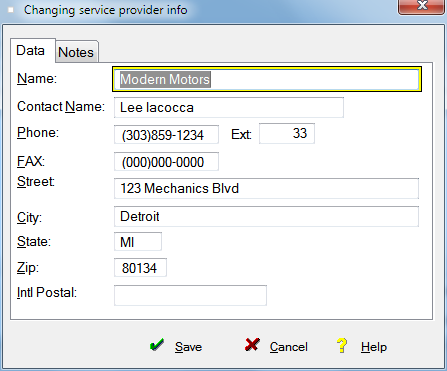
The table contains company name (or just name), contact name, phone numbers, street, city, state, zip and notes.
The table has buttons to View the entry form with no update ability, add a New Provider, Change an existing provider, Delete a provider, Close the window or access Help.
It displays a count on the lower left of the screen of the providers in the table.
The notes tab of the entry form allows you to jot down your notes about service quality, hours, pricing, or whatever you want about a particular provider.
In order to keep your data consistent, if you try to delete a Service Provider who is referenced elsewhere in the database, FleetVIP will present an error message and stop the entry from being deleted.
As with other scrolling tables, this table also has other navigation features described in the Getting Started topic.